
Queenswell Schools
Online Safety
Welcome to the Parents and Carers Online Safety web page!
At The Flourishing Schools Federation, we believe online safety is extremely important. We work very hard to support our children in learning about the online world and the possible dangers they may encounter. Children have dedicated online safety lessons each half term during their computing session, as well as class circle times.
Safeguarding Update: Keeping Our Children Safe from AI Image Risks
Artificial Intelligence (AI) is quickly becoming a part of everyday life. While these new technologies can be great for learning and creativity, they can also be misused. Sadly, some people use AI to create, change, or share fake, inappropriate, or sexual images and videos of children. Under UK law, creating or sharing this kind of material is strictly illegal, even if the images are completely computer-generated and not real.
As you know, we recently changed the way we take and display photos at school. We took this step to protect your children. Keeping our pupils safe is always our top priority.
New Support and Guidance for Families
To help you protect your children at home, CEOP (Child Exploitation and Online Protection) has released a new guide specifically for parents and carers. This guide is designed to help you:
-
Understand AI: Learn how AI works and how easily, every day, innocent photos can be altered or turned into fake images (often called "deepfakes").
-
Spot the Risks: Understand what counts as harmful or illegal content, including AI-edited photos.
-
Take Simple, Practical Steps: Learn how to protect your family, such as checking your privacy settings on social media and thinking carefully about how you share family photos online.
-
Talk to Your Child: Get helpful tips on how to chat with your children about AI, staying safe online, and the importance of asking for permission before sharing photos.
Please take a look at the CEOP guidance. By working together, we can keep our children safe both at school and at home.
CEOP's AI Image Guidance for Parents/Carers
Kids Online Safety Parents/Carers
Keeping your children safe online is a top priority, but it can be difficult knowing where to start. To help, the UK Government (DSIT and DfE) has launched a new, easy to use website for parents.
The new Kids Online Safety Hub provides simple, practical advice to help you protect your child while they use the internet. The website is designed to be clear and covers:
UK Government Kids Online Safety Campaign
Proposed Social Media Ban
The UK government has announced a legal ban on social media for all children under 16, covering major platforms like TikTok, Snapchat, Instagram, YouTube, Facebook and X. They aim to bring it into force by spring 2027 once Parliament has approved the legislation.
But what does the proposed new social media ban mean? Richard Saunders from Understand Tech has put together a helpful guide that outlines the new restrictions and breaks down what parents and children need to know.
The Complete Parent Guide to the Social Media Ban
Safer Internet Day 2026
What was Safer Internet Day 2026 about?
Safer Internet Day is the UK’s biggest celebration of online safety. Each year, the UK Safer Internet Centre covers an online issue or theme that speaks about the issues children and young people are seeing and experiencing online. The theme for 2026 was: Smart tech, safe choices – Exploring the safe and responsible use of AI.
Empowering Our Pupils in the Age of AI
With AI becoming a part of everyday life, we want our children to do more than use technology. We want them to use it safely. This Safer Internet Day, we explored how AI can be a force for good. Our goal is to give our pupils the tools and confidence they need to navigate smart tech responsibly, making informed choices that keep them safe and inspired online.
Please take a look at the UK Safer Internet Centre's top tips for parents, carers and young people.
UK Safer Internet Centre Top Tips for Parents and Carers
UK Safer Internet Centre Top Tips for Young People
There are also quizzes to test your knowledge about online scams. Can you answer all the quiz questions correctly?
Safer Internet Day 2026 Quiz for 7 to 11 year olds
Safer Internet Day 2026 Quiz for 11 to 14 year olds
Breck Foundation Rise e2e Online Safety Project

We are delighted that Queenswell Schools were selected to take part in the Breck Foundation Project Rise e2e, securing a valuable funded place for our school community. We're very happy to be launching this important online safety initiative in the autumn term.
Breck Foundation Post Presentation Parent Pack
Breck Foundation Post Presentation SEND Parent / Teacher Pack
Breck Foundation is coming to Queenswell
Breck Foundation: What's included in the pupil session?
Breck Foundation: Parent Session, when & where?
Breck Foundation: Parent Session, reply form
Anti-Bullying Week 2025
The theme for Anti-Bullying Week 2025 was 'Power for Good'. The theme encourages everyone to use their "powers"—such as kindness, courage, and respect—to stand up to bullying and create a more supportive and inclusive environment.
Odd Socks Day takes place on the first day of Anti-Bullying Week each year to help raise awareness of bullying. We wore our odd socks to school to show that everyone is unique and it's okay to be different.
🔒 Online Safety Policy Update & Smart Technology Rule
We've updated our Federation Online Safety documents and ask that all parents/carers take a moment to read them and discuss the contents with their child/ren. Adhering to these rules is vital for keeping our whole community safe online.
⌚ Important Policy Change: Smart Watches
A key clarification in the updated policies concerns smart technology worn in school.
Pupils are not permitted to wear smart watches or similar smart technology devices in school.
This change is being implemented to:
- Remove technological distractions during the school day.
- Support our focus on learning and engagement.
Please check your child's accessories before they come to school. Thank you for your cooperation in helping us maintain a focused and safe learning environment.
Queenswell Schools Photography Consent
Please complete the photography consent form to advise us of your wishes regarding the taking of photos/videos of your child in school. Click the link or scan the QR code. If you would like help completing the form, please ask. Thank you very much for your support.
Parents / Carers Photography Consent Form
Staying connected
If you, or someone you know, needs help to stay connected digitally, please visit an 02 shop and ask in store for The National Databank. The National Databank provides free mobile data, texts and minutes to those living in data poverty. It’s like a foodbank, but for mobile data.
To receive support via the national databank with a SIM card or voucher, you must fall into the following eligibility criteria:
- 18+ years old
- From a low income household
You must also qualify in at least one of the following statements:
- Have no access or insufficient access to the internet at home
- Have no or insufficient access to the internet when away from home
- Cannot afford their existing monthly contract or top up
When I called 02 to ask how to prove eligibility, I was told that if I were to ask in store for help from The National Databank, I would not need to provide lots of documentation.
Please visit an 02 shop as soon as possible to apply because:
All SIMs and Vouchers are subject to availability, whilst stocks last.
Does your child use Social Media?
At Queenswell Schools, we are very aware that some of our pupils already use or have access to different social media platforms. We do not promote or condone the use of social media platforms and messaging apps that have age limits. What we want to ensure is that, by educating our pupils on how to use these platforms and the internet properly, we will prevent children misusing the sites and help protect them in the future. We believe that this will create a safer culture online.
Please use the Internet Matters links below to explore their advice and support about your child using social media.
Internet Matters Social media facts and advice
Internet Matters: At what age can my child start social networking?
Internet Matters Social media concerns
Internet Matters: Social media benefits
Internet Matters: Useful resources, inc, tech tools and parental controls
Vodafone Digital Parenting
To help you and your family enjoy happy and safe digital lives, the Vodafone Digital Parenting website is regularly updated with articles and expert advice. There are plenty of resources and support to help you make the right digital choices for your family.
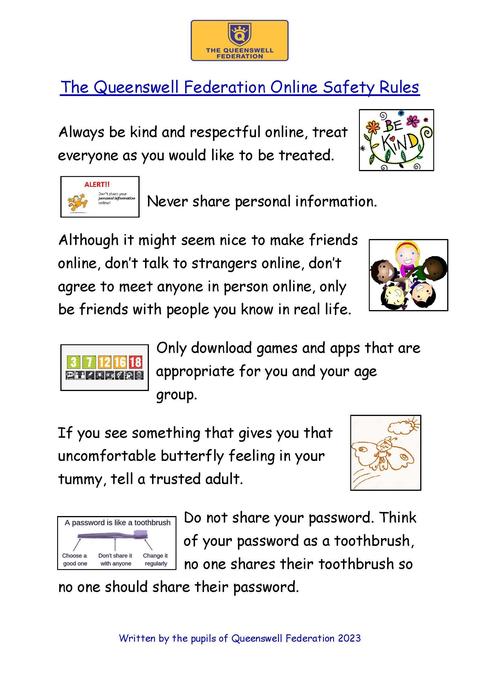
Queenswell Schools Online Safety Rules
Please remind your child/ren to use the school's online safety rules to help keep themselves, their friends and family safe when they are online.
Mrs Smith's Top Online Safety Tips
Ensure your child is using their online device in a family area.
This is because if your child uses their online device to access the Internet, it increases the risk that your child will come across content that may upset them. It also exposes your child to risks like cyberbullying, sexting, inappropriate content, and contact with strangers.
Do you know what your child is doing online?
Do you know what apps your child is using? Are they old enough to be using that app? Do you know who your child is playing games with or communicating with? Do they know who they are playing with online in the real world? It is far too easy for someone to create an account online and pretend to be someone they are not. Please check that your child is playing and communicating with their real life friends.
Foster a no blame culture in your family.
Does your child know they can talk to you or another trusted adult in your family if something makes them feel uncomfortable, worried or sad online? Do they know they can get help from you or another trusted adult if they make a mistake online and click on a link accidentally? Let them know they can always get help and support from you or another trusted adult at home or school.
Is Roblox safe for children to play?
One of the most popular games talked about at Queenswell is Roblox, so I thought it would be a good idea to put a link on here to an interesting article written by Andy Robertson published on Internet Matters. He looks at the game, age ratings, in-game purchases, parental controls, and how to monitor your child's account and online interactions.
Is Roblox safe for children to play?
PARENTSAFE: keeping your children safe: online & beyond
LGFL has created a new one-stop location that offers parents support and advice on settings, apps, games, talking to children about life online, screen time and key topics, including bullying, extremism, fake news, etc.
They have included an updated digital family agreement that you are able to download and customise for your specific needs.
PARENTSAFE: keeping your children safe: online & beyond
NSPCC
The NSPPC have reviewed the most popular sites, apps and games that children and young people use, e.g. Minecraft, Instagram & WhatsApp. Click the link below to find out more information about content suitability, age ratings, and quotes from parents, children and young people.
nspcc.org.uk/keeping-children-safe/online-safety/online-games/
nspcc.org.uk/keeping-children-safe/online-safety/
Child Exploitation and Online Protection Command (CEOP)
CEOP is here to keep children safe from sexual abuse and grooming online. You can make a report directly to the CEOP Safety Centre by clicking on the Click CEOP button if something has happened online which has made you feel unsafe, scared or worried. This might be from someone you know in real life, or someone you have only ever met online. CEOP take all reports seriously and we will do everything we can to keep you safe.
As well as making a report to the CEOP Safety Centre, the CEOP Education website has information and advice to help you if something has happened to you online.
Are you being bullied? CEOP are unable to respond to reports about bullying, but if you’re being bullied and would like to talk to someone in confidence right now, you can speak to Childline on 0800 1111 or talk to them online – no worry is too big or too small.
